

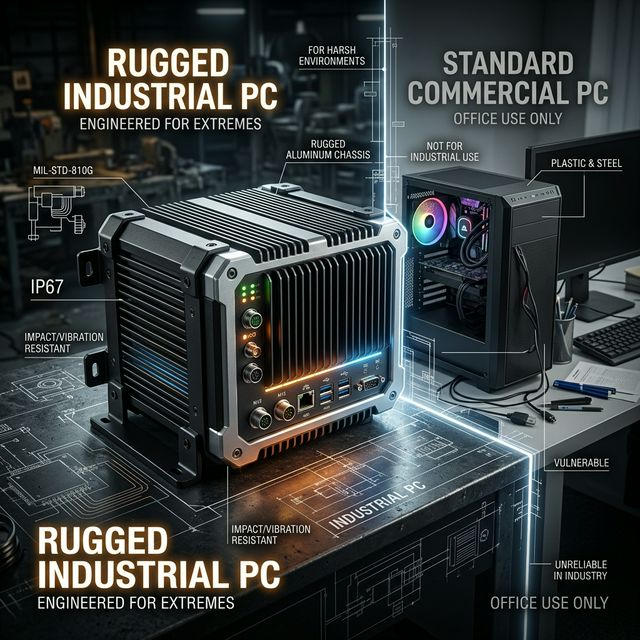
The rigorous demands of industrial environments often exceed the physical limits of standard commercial computers. When deploying automated control systems, machine vision, or remote monitoring equipment, selecting the correct computing platform can have a decisive impact on the project's Total Cost of Ownership (TCO) and Mean Time Between Failures (MTBF).
Before diving into technical specifications, we need to clarify one core difference: commercial PCs are designed to run performance-intensive software in temperature-controlled, clean office environments, while Industrial PCs (IPCs) are engineered to execute mission-critical tasks with absolute stability 24/7/365 under conditions involving dust, extreme vibrations, and volatile temperatures.
12 Key Dimension Comparison Matrix
To help you immediately identify the essential architectural differences between industrial PCs and consumer-grade desktops, we have compiled the following technical matrix across 12 key dimensions:
| Dimension | Industrial PC (IPC) | Commercial Desktop |
|---|---|---|
| Operating Temperature | -20°C to 60°C (Wide temp: -40°C to 70°C) | 0°C to 35°C |
| Shock & Vibration | 5G vibration (IEC 60068-2-6), 50G shock | Unrated / Very Low |
| Ingress Protection | IP65 (Front bezel), Fully sealed chassis | None (Ventilated chassis) |
| Cooling Mechanism | Fanless passive cooling / Industrial fans | Consumer-grade fans (Prone to dust accumulation) |
| Product Lifecycle | 5-7+ years guaranteed supply | 1-2 year product cycle |
| MTBF | 50,000-100,000 Hours | 20,000-30,000 Hours |
| Serial Ports (RS232/485) | Standard 2-8 ports | None (Requires adapters) |
| CAN Bus / GPIO / DIO | Supported natively on most models | Not supported |
| Network Interfaces | 2-6 GbE Ports (Some support 10GbE) | 1 Port (Consumer-grade NIC) |
| Power Input | DC 9-36V Wide voltage, AT/ATX, PoE | AC 110-240V (Fixed power supply) |
| Operating Systems | Windows IoT, Linux (Ubuntu/Debian), Android | Windows Home/Pro |
| Base Price Range | $300 - $2000+ (Configuration dependent) | $200 - $800 |
The Underlying Logic of IPC Design: Why Don't They Crash?
1. True "Aluminum Ice Blocks": Fanless Design
Modern industrial PCs heavily utilize fanless passive cooling designs. By connecting the CPU directly to a massive aluminum alloy chassis with extruded fins, the entire machine acts as a giant heatsink.
[!TIP] No fans means no dust intake, preventing internal components from short-circuiting due to static and metallic dust. Crucially, it eliminates the fan—the number one source of mechanical failure.
2. Wide Voltage and Power Isolation
The power grids on factory floors are infamously unstable, with the starting and stopping of heavy machinery causing massive voltage surges or spikes. IPCs are equipped with DC 9-36V wide-voltage inputs and motherboard-level OVP/OCP/UVP power isolation circuits. This line of defense ensures that even if external voltage fluctuates wildly, the internal core processing unit receives pure, stable DC power.
3. The "Holdouts" of I/O Ports: RS232 & GPIO Are Not Dead
Many junior engineers ask: Why do industrial PCs still support ancient serial ports? The answer is simple: In manufacturing, millions of dollars' worth of legacy PLCs, CNC machines, barcode scanners, and sensors still rely on the hyper-stable RS-232/422/485 protocols. Commercial computers abandoned these inputs a decade ago, but IPCs not only retain them—they often add optic isolation protection to them.
Start Your Hardware Selection Journey
Has your application encountered the challenges of harsh environments and the strict requirement for 24-hour continuous uptime? With over a decade of deployment experience, Yantronic is ready to assist. Browse our Compact IPC product line, or contact our engineering team directly for a free project architecture and hardware configuration evaluation.